I spent the last week testing 10 browser-based merge games to see which ones are actually worth your time. Some are surprisingly deep, others are shameless clones, and a few made my laptop fan spin like a jet engine. Here's what I found.
Looking for even more merge games? Check out our full collection of merge games with hundreds of titles to explore.
TL;DR (Quick Summary)
Best Overall: Mansion Tale: Merge Secrets - Best production value with engaging story and smooth progression
Best Graphics: 2048 Merge - Premium visual themes with hypnotic shader effects and clean UI
Best for Beginners: Watermelon Game - Simple drop-and-merge mechanics that anyone can grasp in 10 seconds
Total Games: 10 browser games tested
Tested on: MacBook/PC, Chrome browser, no special hardware
Average Rating: 4.4/5.0
Quick Comparison Table
1. 2048 Merge
Quick Info
Genre: Number Puzzle
Developer: 27Studio
Rating: 4.9/5.0 (76 ratings)
Screenshots
2048 puzzle game board
What's the Point?
This is 2048 with a twist: instead of swiping, you click and drag to select entire groups of identical tiles. When you release, the whole group merges at once, which feels way more satisfying than the original. The game includes 8 visual themes (Aurora, Neon, Lava) that change the background shaders, though the core gameplay stays the same. It's still about doubling numbers until you hit 2048 or higher, but the group selection adds a layer of strategy. You can plan bigger combos instead of just sliding tiles randomly.
Personal Experience
From the author: When I first loaded this, I expected another generic 2048 clone. But the group-merge mechanic actually changed how I approached the puzzle. Instead of mindlessly swiping, I found myself scanning the board for clusters of identical numbers, planning 3-4 tile merges in one move. The Aurora theme looks nice, but honestly, I stuck with the default because the fancy shaders didn't add much. The game runs smooth, no lag, and the merge animations are quick enough that you don't feel like you're waiting.
How to Play
Controls: Click and hold a tile, drag across neighbors with the same value to highlight a group, release to merge
Goal: Merge tiles to reach 2048 or higher while managing board space
Performance & Browser Compatibility
Speed: Instant loading, 60fps smooth animations, no lag
Works best on: Desktop (mouse precision helps with group selection)
Browser: Chrome, Firefox, Safari (HTML5)
Who is this game for?
Perfect for casual puzzle fans aged 13-40 who want a familiar 2048 experience with a small twist. Great for quick 5-10 minute sessions during breaks. If you've played 2048 to death, this adds just enough novelty to feel fresh for a few rounds.
Pros & Cons
✅ Pros
Group merging is more strategic than standard 2048
Clean UI with optional visual themes
Runs perfectly smooth, no performance issues
⛔ Cons
Still just 2048 with minor changes
Visual themes feel gimmicky and don't affect gameplay
Gets repetitive after 20 minutes like the original
2. Merge guns versus zombies

Quick Info
Genre: Auto-Battler
Developer: nobodyshot ltd
Rating: 4.3/5.0 (731 ratings)
Screenshots
Weapons attacking enemies
Auto-battle in progress
Boss battle on grid

What's the Point?
This is a tower defense/auto-battler hybrid where you place weapon units on a grid and watch them shoot zombies. Merge two identical weapons to upgrade them, then position them strategically to maximize damage. The game runs itself once you place units—you're just managing the grid and deciding where to merge. It's heavily inspired by mobile merge games, with the same low-poly art style and simple progression loop. You unlock new unit types as you clear stages, but the core mechanic never changes.
Personal Experience
From the author: I clicked 'play' expecting some actual tower defense action, but this is 90% watching units auto-fire at zombies. The merging is satisfying for the first few rounds, but once you realize the optimal strategy (merge everything, place high-tier units in front), it becomes mindless. The low-poly graphics are fine but generic. My laptop didn't struggle at all, which makes sense given the simple visuals. I played for about 15 minutes before getting bored.
How to Play
Controls: Buy units, drag identical units together to merge, place them on the grid
Goal: Merge and position units to defeat waves of zombies and progress through stages
Performance & Browser Compatibility
Speed: Fast loading, stable 60fps, no frame drops
Works best on: Desktop or mobile (simple UI works on both)
Browser: Chrome, Firefox, Safari (HTML5)
Who is this game for?
Casual mobile gamers aged 10-25 who enjoy idle games or auto-battlers with minimal input. Good for background play while multitasking. If you want active gameplay, skip this—it's mostly watching units shoot.
Pros & Cons
✅ Pros
Simple merge mechanics are easy to understand
Runs smoothly with no lag
Good for passive play while doing other things
⛔ Cons
Extremely repetitive after 10 minutes
Generic low-poly visuals with no personality
Almost no player agency once units are placed
3. Dice Merge
Quick Info
Genre: Grid Puzzle
Developer: Anna Inc
Rating: 4.3/5.0 (3 ratings)
Gameplay Video
Watch real gameplay footage
Screenshots
Player places dice
Dice merge animation
Row clear effect
What's the Point?
You drop dice onto a 5x5 grid, and when three identical dice touch, they merge into a higher-value die. The twist is you can rotate each die before placing it, which... doesn't matter much since dice values are the same on all sides. The game adds a 'Magic dice' that clears a 3x3 area when you merge three six-dot dice, which is the only strategic element. Otherwise, it's just Tetris-style grid management with dice instead of blocks.
Personal Experience
From the author: The first thing I noticed was how slow the pace is. Each die takes a second to drop, and the merge animation feels sluggish. I kept clicking to rotate dice, but then I realized it's pointless because the rotation doesn't affect gameplay at all—it's just visual. The Magic dice mechanic is cool when it triggers, but getting three six-dot dice to line up takes forever. After 10 minutes, I felt like I was just waiting for the game to let me place the next die.
How to Play
Controls: Click to rotate dice, drag to place them on the grid
Goal: Merge three identical dice to create higher values and avoid filling the grid
Performance & Browser Compatibility
Speed: Moderate loading, 30-40fps with occasional stutters during merges
Works best on: Desktop (larger screen helps with grid planning)
Browser: Chrome, Firefox, Safari (HTML5)
Who is this game for?
Casual puzzle fans aged 8-40 who want a low-stakes, slow-paced game for short sessions. Good for kids or anyone looking for a brain-teaser without time pressure. Not ideal if you like fast-paced action.
Pros & Cons
✅ Pros
Simple mechanics with no learning curve
Magic dice adds a small strategic layer
Clean, readable UI with bright colors
⛔ Cons
Dice rotation is completely pointless
Slow pace makes it feel sluggish
Direct clone of existing dice merge games with no originality
4. Mansion Tale: Merge Secrets
Quick Info
Genre: Merge Puzzle + Simulation
Developer: TAPCLAP
Rating: 4.2/5.0 (18562 ratings)
Gameplay Video
Watch real gameplay footage
Screenshots
Merging items gameplay board
Unlocking new garden areas
Solving mystery narrative elements
What's the Point?
This is the most polished game on the list. You merge items on a board to complete quests and restore a dilapidated mansion. The game wraps the merge mechanic in a mystery narrative with animated characters and dialogue. You're helping Ashley, a designer, uncover secrets while decorating rooms. The merge board is standard (combine items to create new ones), but the story progression and area restoration give it purpose. It's essentially Merge Dragons meets home renovation.
Personal Experience
From the author: I was skeptical at first because these story-merge games are usually shallow, but this one hooked me. The cinematic intro with the butler and protagonist set up a mystery vibe, and the isometric mansion areas look great. The merge board itself is nothing special, but unlocking new story beats kept me playing longer than expected. I restored a museum staircase, which triggered a cutscene, and suddenly I cared about the plot. The animations are smooth, and the game never lagged. I played for 30 minutes straight, which is rare for me with browser games.
How to Play
Controls: Tap items to reveal new ones, drag identical items together to merge, use merged items to complete tasks
Goal: Merge items to restore the mansion, unlock story chapters, and solve the mystery
Performance & Browser Compatibility
Speed: Quick loading, smooth 60fps animations, no lag even with multiple merges
Works best on: Desktop or mobile (optimized for both)
Browser: Chrome, Firefox, Safari (HTML5)
Who is this game for?
Casual gamers aged 25-45 who enjoy narrative-driven puzzle games with light resource management. Perfect for anyone who likes home restoration games or mystery stories. Sessions can be short (10 minutes) or long (1+ hour) depending on how invested you get in the story.
Pros & Cons
✅ Pros
Best production value with animated cutscenes and voice acting
Story gives the merge mechanic purpose
Smooth performance with no technical issues
⛔ Cons
Core merge mechanic is still repetitive
Energy system likely gates progress (typical mobile port)
Story is cheesy but serviceable
5. Watermelon Game
Quick Info
Genre: Physics Puzzle
Developer: Dmitry FTD
Rating: 4.6/5.0 (2630 ratings)
Gameplay Video
Watch real gameplay footage
Screenshots
Fruits merging in container
Game title, fruit stickers
Stacking fruits carefully
What's the Point?
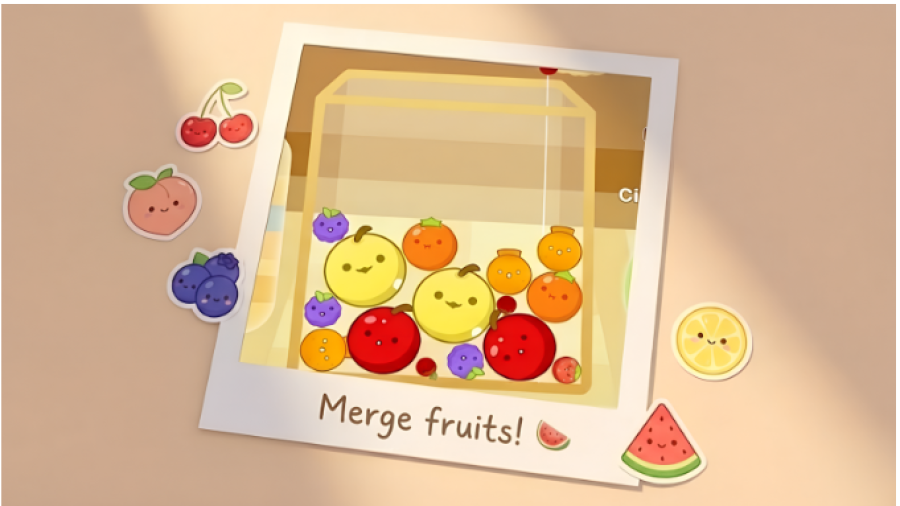
This is the Suika Game (Watermelon Game) that went viral. You drop fruits into a container, and when two identical fruits touch, they merge into a larger fruit. The physics simulation is basic but functional—fruits bounce and settle realistically. The goal is to create the biggest fruit (watermelon) without overflowing the container. It's simple, addictive, and perfect for quick sessions. The game's appeal is in the satisfying 'pop' when fruits merge and the Tetris-like tension of managing limited space.
Personal Experience
From the author: I've played the original Suika Game on Switch, and this browser version is nearly identical. The physics feel slightly floaty compared to the original, but it's close enough. I dropped two small berries, they merged into an orange, and I was hooked. The game's pace is slow and deliberate, which I appreciate—no time pressure, just planning where to drop the next fruit. I played for 20 minutes trying to get a watermelon and failed miserably. The container filled up fast, and I had to restart. It's frustrating but in a 'one more try' way.
How to Play
Controls: Tap or click to drop a fruit into the container
Goal: Merge identical fruits to create larger ones and reach the watermelon without overflowing
Performance & Browser Compatibility
Speed: Instant loading, smooth 60fps physics simulation
Works best on: Desktop or mobile (works equally well on both)
Browser: Chrome, Firefox, Safari (HTML5)
Who is this game for?
Casual gamers of all ages who want a relaxing puzzle game with simple mechanics. Perfect for quick 5-10 minute sessions or longer if you're chasing a high score. Great for kids due to cute fruit theme and no complex UI.
Pros & Cons
✅ Pros
Simple drop-and-merge mechanics anyone can learn instantly
Satisfying physics and merge animations
Runs perfectly smooth with no lag
⛔ Cons
Direct clone of Suika Game with no originality
Physics feel slightly floaty compared to the original
Gets repetitive after 20-30 minutes
6. Monster Merge: Legends Alive
Quick Info
Genre: Merge Puzzle
Developer: Vradjarad
Rating: 4.4/5.0 (1283 ratings)
Gameplay Video
Watch real gameplay footage
Screenshots
Merging units, countdown active
Units falling, merging animation
New unit spawned, game
What's the Point?
This is another Suika Game clone but with monsters instead of fruits. You drag and drop monster bubbles, and when two identical ones collide, they merge into a higher-tier monster. The physics are similar to Watermelon Game, with units bouncing and settling under gravity. The dark fantasy aesthetic sets it apart visually, but the core mechanic is identical. The game ends if any unit crosses a red line at the top, so it's all about managing space and planning merges.
Personal Experience
From the author: I played this right after Watermelon Game, and it felt like the exact same game with a different skin. The monster theme is cool if you're into dark fantasy, but the physics feel slightly jankier—units sometimes clip through each other or get stuck. The merge animations are okay, but the explosions are underwhelming. I appreciate the effort to differentiate with the aesthetic, but it's not enough to make this stand out. I played for 15 minutes and then went back to Watermelon Game.
How to Play
Controls: Drag and drop monster units to merge them
Goal: Merge identical monsters to create higher-tier units and prevent them from crossing the red line
Performance & Browser Compatibility
Speed: Moderate loading, 40-50fps with occasional stutters during large merges
Works best on: Desktop (larger screen helps with grid planning)
Browser: Chrome, Firefox, Safari (HTML5)
Who is this game for?
Casual puzzle fans aged 10-30 who prefer a darker aesthetic over cute fruits. Good for short sessions without time pressure. If you've played Suika Game, this won't feel fresh.
Pros & Cons
✅ Pros
Dark fantasy theme is a nice change from fruit games
Physics-based merging is satisfying when it works
Simple mechanics with no learning curve
⛔ Cons
Physics feel jankier than Watermelon Game
Direct clone with minimal originality
Merge animations lack impact
7. Merge World
Quick Info
Genre: City Builder + Merge
Developer: Inlogic Software s.r.o.
Rating: 4.2/5.0 (180 ratings)
Gameplay Video
Watch real gameplay footage
Screenshots
Building a wooden cottage
Merging three houses
Collecting resources, building structures
What's the Point?
This is a mobile-style merge game where you collect resources (wood, stone) by tapping on them, then use those resources to build structures. The merge mechanic comes in when you combine three identical houses to create a larger, upgraded house. Everything is gated by energy and timers, which is typical for mobile ports. The isometric grid and fairy workers give it a casual, fantasy vibe. It's Merge Dragons but with a generic village-building theme.
Personal Experience
From the author: I tapped on a tree, waited 3 seconds for it to drop wood, then tapped again. And again. And again. The game is 90% waiting for timers to finish. I built a house, which took 10 seconds, then merged three houses into a bigger house, which took another 10 seconds. The merge 'pop' is satisfying, but the constant waiting killed any momentum. I could see the premium currency (stars) everywhere, which tells me this is designed to push you toward spending. I played for 10 minutes and felt like I'd barely done anything.
How to Play
Controls: Tap resources to collect, drag identical items to merge, use resources to build structures
Goal: Merge items to build and upgrade structures, restore the mansion, and progress through the story
Performance & Browser Compatibility
Speed: Moderate loading, 30-40fps with occasional lag during merges
Works best on: Mobile (designed for touch controls and short sessions)
Browser: Chrome, Firefox, Safari (HTML5)
Who is this game for?
Casual mobile gamers aged 8-16 who enjoy collecting and building with low mechanical complexity. Perfect for short, repetitive sessions throughout the day. If you hate timers and energy systems, avoid this.
Pros & Cons
✅ Pros
Cute cartoonish art style with bright colors
Merge mechanic is satisfying when it triggers
Clear progression with building upgrades
⛔ Cons
Everything is gated by timers and energy
Direct clone of Merge Dragons with no originality
Designed to push premium currency purchases
8. Chicken Merge
Quick Info
Genre: Tower Defense + Merge
Developer: Beedo Games
Rating: 4.6/5.0 (3134 ratings)
Gameplay Video
Watch real gameplay footage
Screenshots
Defense line, enemy advance
Upgrade army chickens
Earn coins defenses
What's the Point?
This is a tower defense game where you place chicken units on a grid to automatically shoot zombie enemies. Merge two identical chickens to upgrade them into stronger units. Gold accumulates passively, and you use it to buy more chickens or level them up. The game is pure auto-battler—you place units, they shoot, enemies die, you earn gold, repeat. It's a blatant Plants vs. Zombies clone with chickens instead of plants.
Personal Experience
From the author: I placed a chicken, it started shooting zombies, and I immediately recognized the PvZ formula. The auto-battle is fine, but there's no strategy beyond 'place high-tier units in front.' I upgraded a few chickens, watched them mow down zombies, and felt... nothing. The game plays itself. I tapped the 'x2 speed' button to make it go faster, which tells you how slow the default pace is. I played for 15 minutes while browsing Reddit because the game doesn't need my attention.
How to Play
Controls: Use gold to buy chickens, drag identical chickens together to merge, place them on the grid
Goal: Merge and place chickens to defend against waves of zombies and survive as long as possible
Performance & Browser Compatibility
Speed: Fast loading, stable 50-60fps with occasional drops during large waves
Works best on: Desktop or mobile (simple UI works on both)
Browser: Chrome, Firefox, Safari (HTML5)
Who is this game for?
Casual gamers aged 8-16 who prefer passive gameplay with incremental progression. Good for multitasking or background play. If you want active tower defense, this isn't it.
Pros & Cons
✅ Pros
Simple merge and place mechanics are easy to grasp
Cartoon style is colorful and kid-friendly
Runs smoothly with no major lag
⛔ Cons
Shameless Plants vs. Zombies clone
Almost no player agency once units are placed
Extremely repetitive and passive
9. Piece of Cake: Merge & Bake
Quick Info
Genre: Merge Puzzle + Simulation
Developer: HAPPY GAMES STUDIO
Rating: 4.0/5.0 (2663 ratings)
Gameplay Video
Watch real gameplay footage
Screenshots
Merge puzzle gameplay grid
Cafe renovation before after
Cafe exterior character business
What's the Point?
This is a merge game with a cafe renovation twist. You combine basic food items (toast, eggs, coffee) to create more complex dishes, which you then use to fulfill customer orders or complete renovation tasks. The game wraps the merge mechanic in a story about Emily growing her cafe. It's similar to Mansion Tale but with a food theme. The merge board is standard, but the cafe management and story progression add context.
Personal Experience
From the author: I dragged two slices of toast together, they merged into a sandwich, and I felt that familiar merge-game dopamine hit. The food theme is cute, and the glowing outlines on combinable items make it easy to plan moves. The story is generic (girl inherits cafe, needs to fix it up), but it's enough to keep me engaged. I played for 20 minutes, completed a few orders, and unlocked a new cafe area. The game runs smooth, no lag, and the 'pop' animation on merges is satisfying. It's not groundbreaking, but it's competent.
How to Play
Controls: Drag identical food items together to merge, use merged items to fulfill orders
Goal: Merge food items to complete customer orders, renovate the cafe, and progress through the story
Performance & Browser Compatibility
Speed: Quick loading, smooth 60fps animations, no lag
Works best on: Mobile (designed for touch controls and short sessions)
Browser: Chrome, Firefox, Safari (HTML5)
Who is this game for?
Casual gamers aged 10-40 who enjoy relaxing puzzle games with light narrative and customization. Perfect for short, stress-free sessions. Great for anyone who likes cooking or cafe management themes.
Pros & Cons
✅ Pros
Cute food theme with clear iconography
Merge mechanic is satisfying with good visual feedback
Story adds context and progression
⛔ Cons
Core merge mechanic is repetitive
Generic story with no surprises
Energy system likely gates progress
10. Fruit Merge: Juicy Drop Game
Quick Info
Genre: Physics Puzzle
Developer: Bravestars
Rating: 4.8/5.0 (2505 ratings)
Gameplay Video
Watch real gameplay footage
Screenshots
Fruits merging in container
Game title screen
Satisfying merge effect
What's the Point?
This is yet another Suika Game clone. You drop fruits into a container, and when two identical fruits touch, they merge into a larger fruit. The physics are basic, the visuals are clean, and the gameplay is identical to Watermelon Game. The only difference is the fruit sprites and slightly different particle effects. If you've played any Suika Game variant, you've played this.
Personal Experience
From the author: I loaded this after playing Watermelon Game and Monster Merge, and I immediately felt deja vu. The physics are nearly identical, maybe slightly less floaty. I dropped a few fruits, watched them merge, and got bored within 5 minutes because I'd literally just played this exact game twice before. The particle effects are fine, the UI is clean, but there's zero originality. It runs smooth, no lag, but that's the bare minimum. I closed it after 10 minutes.
How to Play
Controls: Tap or click to drop a fruit into the container
Goal: Merge identical fruits to create larger ones and achieve the highest score without overflowing
Performance & Browser Compatibility
Speed: Instant loading, smooth 60fps physics simulation
Works best on: Desktop or mobile (works equally well on both)
Browser: Chrome, Firefox, Safari (HTML5)
Who is this game for?
Casual gamers aged 6-60 who want a simple, relaxing puzzle game with no learning curve. Perfect for quick breaks or unwinding. If you've already played Watermelon Game, skip this—it's the same thing.
Pros & Cons
✅ Pros
Clean visuals with smooth animations
Simple drop-and-merge mechanics anyone can learn
Runs perfectly with no lag
⛔ Cons
Shameless Suika Game clone with zero originality
Offers nothing new if you've played Watermelon Game
Gets repetitive after 10 minutes